
Back to Product & Strategy

Product case study

Discord

Making it easier for new users to find their people.

I explored where Discord’s onboarding creates friction for new users, researched the problem, and designed a friend-discovery concept around contact syncing and search.

  • User Research
  • Product Strategy
  • UX
  • Prioritization
  • Metrics
survey respondents
52
primary persona
1
solution directions
5
concept flow
9-step

Understanding the problem

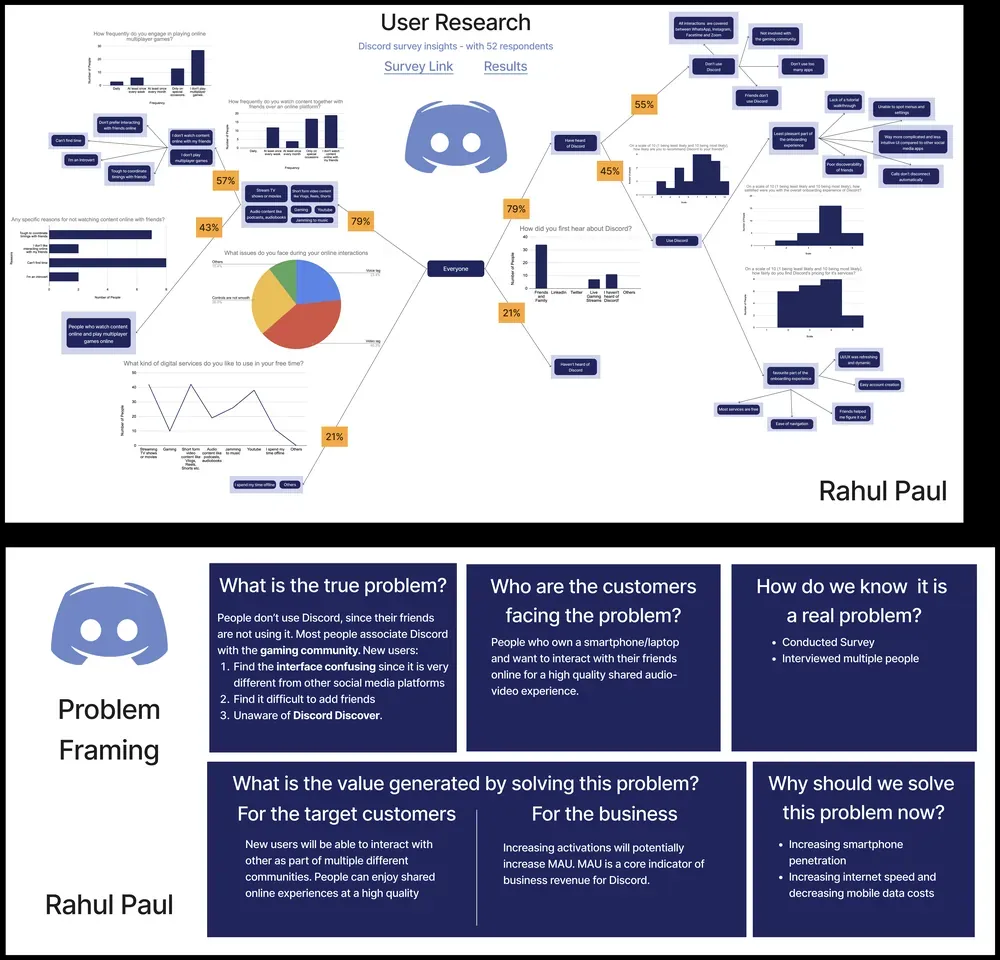
A survey of 52 respondents and follow-up interviews explored awareness, usage, and where new users struggle.

79%Had heard of DiscordAmong the 52 survey respondents
21%Had not heard of DiscordAmong the 52 survey respondents
55%Don't use DiscordAmong respondents who had heard of it
45%Use DiscordAmong respondents who had heard of it

Discovery problem

Many people associate Discord primarily with gaming, so those outside the gaming community are less likely to have heard of it or considered using it.

Friend-discovery problem

New users found it difficult to add or find friends. There's no easy way to search by email, phone number, or synced contacts.

Interface problem

The interface felt unfamiliar and more complicated compared with other social media platforms respondents already used.

Feature-discovery problem

Users were largely unaware of Discord Discover, the feature meant to help them find relevant public servers.

Following one new user

His onboarding journey

Photo of Harsh from the original persona board, seen from behind at a desk with headphones around his neck and two monitors.

Meet Harsh

Harsh Bandhe · 18 · First-year engineering student

Harsh plays online multiplayer games and wants an easy way to keep playing with friends who are now in different cities.

What he needsAn easy way to stay connected with friends and keep playing together, without lag or extra cost.
At this stage…

  • Prompted to interact with the app directory, explores adding a TDS extension to play with friends, verifies email.
  • Harsh explores ways to play with friends.

Key pain points

  • Does Discord have an app? Maybe I should check.
  • The app directory may be better introduced after I've seen the server.
View original persona & journey

Exploring solutions

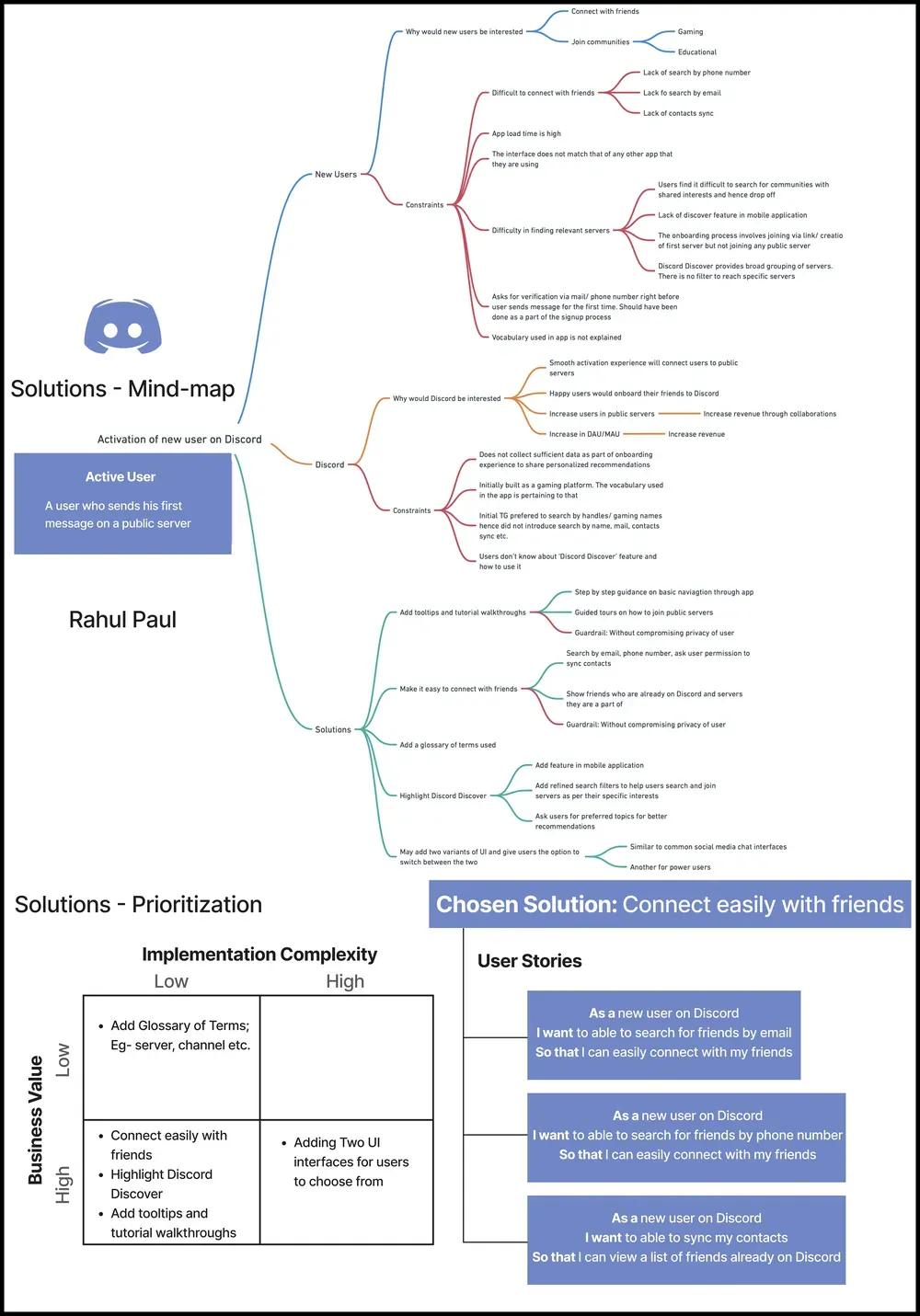
Five directions were compared by business value and implementation complexity. Friend discovery emerged as the chosen direction.

Add tooltips & tutorial walkthroughs

Step-by-step guidance on basic navigation, plus guided tours to join public servers.

Chosen

Make it easy to connect with friends

Search by email or phone number, sync contacts, show which friends are already on Discord and which servers they're in.

Add a glossary of terms

Explain vocabulary like “server” and “channel” that new users don't yet know.

Highlight Discord Discover

Surface the feature in the mobile app, add refined search filters, ask for preferred topics.

Offer two UI variants

Let users choose between an interface similar to common social apps, or the current power-user interface.

Business value ↑ · Implementation complexity →

High valueLow effort

  • ★ ChosenConnect easily with friends
  • Highlight Discord Discover
  • Add tooltips & tutorial walkthroughs

High valueHigh effort

  • Two UI interfaces

Low valueLow effort

  • Add glossary of terms

Low valueHigh effort

No candidates

Prioritized by business value and implementation complexity; no within-quadrant scoring was used.

Chosen solution

Connect easily with friends

Enable new users to quickly find and connect with friends through contact syncing and search by email or phone number.

User stories

  1. 1

    As a new user on Discord, I want to be able to search for friends by email, so that I can easily connect with my friends.

  2. 2

    As a new user on Discord, I want to be able to search for friends by phone number, so that I can easily connect with my friends.

  3. 3

    As a new user on Discord, I want to be able to sync my contacts, so that I can view a list of friends already on Discord.

Original solutions mind-map · scroll to explore

Interactive prototype

Concept flow: from first login to inviting friends

A 9-step concept showing how new users can discover ways to invite friends, sync contacts, search directly and share invite links.

Open in Figma (opens in a new tab)

1 / 9

Step 01

Invite friends

After creating or joining a server, the onboarding checklist highlights “Invite your friends” as the first action.

  • PlacementAppears right after creating or joining a server
  • ChecklistSits alongside personalize, first message and download-app tasks

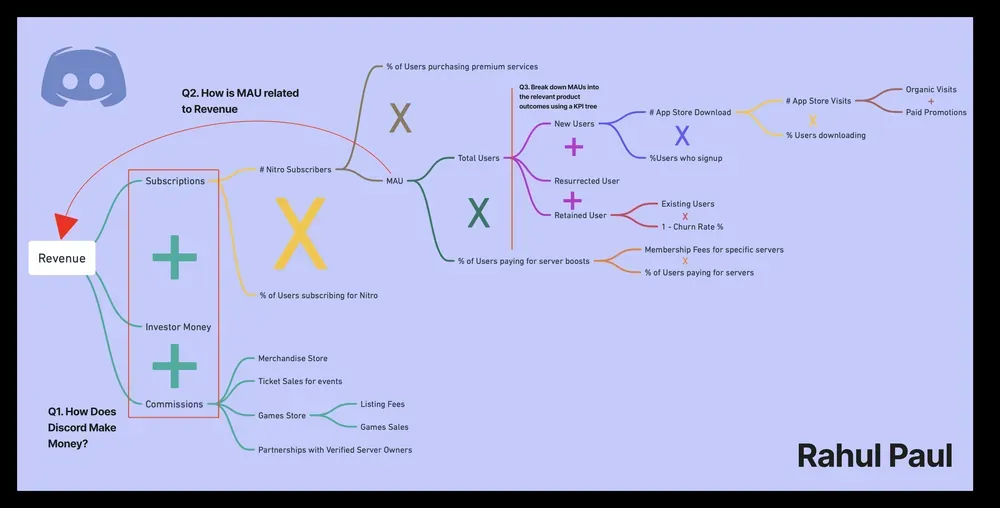
From activation to MAU

A proposed measurement framework for this product exercise. The concept was not shipped or measured.

MAUNew UsersApp visits → Downloads →SignupsRetained Users1 − Churn rateResurrected UsersReactivated usersMeasurement framework, not measured shipped impact

MAU

  • New UsersApp Store visits (organic + paid) × download rate × signup rate
  • Retained UsersExisting users × (1 − churn rate)
  • Resurrected UsersReactivated users
Measurement framework, not measured shipped impact

Monetization opportunities

  • Nitro subscriptions% of users purchasing premium services
  • Server boosts% of users paying for servers
  • CommissionsGames store, merchandise, events

Potential business logic from the source model, not observed impact.

Original MAU & revenue model · scroll to explore

Original artifacts (5)