Operational work spans customer support, implementations, knowledge management, managed-services automation and reporting. The prototype explores how AI could reduce repetitive analysis and surface next actions across those workflows.
Customer support
Implementations
Knowledge management
Managed services
Reporting
1
Work is fragmented
Support, implementations, knowledge, managed services and reporting each live in a different workflow.
2
Analysis is repetitive
Reading a ticket, drafting a reply, building an onboarding checklist or spotting a documentation gap is manual and repeated.
3
One AI-assisted prototype
Five pages, one per workstream, share a single demo dataset and a single AI layer.
4
Next actions surfaced
Each page turns its input into a structured result a person can act on.
An independent prototype built for demonstration. All data is synthetic, it makes no claim about real usage or efficiency gains, and it is not affiliated with or endorsed by Togetherwork.
Five operational roles, grouped by the workstream they own. Each card lists only what the prototype gives that role.
Support operationsTriage tickets by category, sentiment, urgency and churn risk, review a routing decision with a confidence score, and edit an AI-drafted reply before approving or escalating.
Implementation and professional servicesTrack client onboardings by stage and risk, and expand a row for a tailored checklist, blockers, configuration notes and a next action.
Knowledge and documentation ownersBrowse published articles and see documentation gaps ranked by how many tickets point at them.
Managed services and operationsWatch a queue of recurring billing, payroll and reconciliation tasks, see exceptions called out, and run a simulated workflow.
Product and operations leadersRead cross-page metrics: ticket volume, deflection, sentiment and category mix, and a modeled hours-saved figure.
Screenshots of each appear in the walkthrough below.
SupportImplemented353 seeded tickets with search and status, brand, vertical and priority filters. Selecting a ticket runs AI triage and drafts a reply with knowledge-base suggestions; Approve & Send and Escalate update the ticket in the session.
ImplementationsImplementedEight client onboardings (seven active) with metric cards that act as filters, a five-stage progress track and full-row expand. One AI call per implementation produces a checklist, blockers, a configuration document and a next action.
KnowledgePartialPublished-article metrics, search and category filters, working links, and eleven documentation gaps with draft badges. The Claude article-generation flow and coverage scores are not built yet.
Managed servicesPartialTask metrics, status filters, exception callouts and a scheduled to running to complete workflow simulation. It is a timer-driven simulation, not an integration. Health bars and the Monday pulse are not built yet.
AnalyticsImplementedLive counts from the same session state: AI actions, ticket deflection, sentiment and category mix. Hours saved is modeled from assumed minutes per automated unit, not measured.
The deployable architecture, not the local-only prototype. The original app called Anthropic straight from the browser with a key in the Vite bundle, which is safe only on a laptop. The groups below separate what was originally built from the changes made to host it publicly.
01
Original prototype
The React client and synthetic data, as built.
React + Vite appClient
Implemented in the prototype
Five pages with client-side state. Reset restores the seed data. History-API routes (/support, /implementations, /knowledge, /managed-services, /analytics) were added for deployment.
→Deterministic mock dataReads seeded demo data
→/api/claude Pages FunctionPOST { operation, payload }; no key, no prompt
→Offline samplesFalls back on 503, 429 or an error
→Real persistenceWould replace in-memory state
→Authentication and audit loggingWould gate access
→Real integrationsWould replace mock datasets
Deterministic mock dataClient
Implemented in the prototype
353 tickets (the first ten handcrafted, the rest generated), plus implementations, articles, tasks and analytics history, bundled into the app.
02
Public-deployment hardening
Added to make a public deployment safe; not part of the original source.
Cloudflare PagesGateway
Implemented in the prototype
Hosts the static Vite build and falls back to the app shell for the five routes.
→React + Vite appServes the static build and routes
/api/claude Pages FunctionService
Implemented in the prototype
Accepts an operation name (triage, response or implementation) plus demo data, builds the prompt from server-held templates and calls Anthropic with the server-side key.
→Request guardsValidates and limits each request
→Anthropic API (Claude Sonnet 4.6)Server-side key, fixed model, server-held prompt
Request guardsService
Implemented in the prototype
Same-origin check, body and field size caps, per-operation token caps, a best-effort per-IP rate limit and an AI kill switch.
Offline samplesClient
Implemented in the prototype
Rule-based fallback shown, and labelled, when the AI is unavailable, rate limited or erroring. Analytics does not count it as AI output.
03
Model provider
Called only from the server.
Anthropic API (Claude Sonnet 4.6)Service
Implemented in the prototype
Returns JSON that the app parses with parseModelJson().
04
Proposed
Not in the prototype.
Real persistenceData store
Proposed / evaluated
Ticket, implementation and article state currently lives only in the browser session.
Authentication and audit loggingGateway
Proposed / evaluated
The prototype has no accounts, authorization or audit trail.
Real integrationsService
Proposed / evaluated
Support desk, PSA, billing and payroll systems are mocked, not connected.
How one AI action runs
Every AI action runs on Claude Sonnet 4.6.
1
Select an input
A ticket in Support, or an implementation row.
Browser
2
Send an operation
Only the operation name and demo data leave the browser.
POST /api/claude
3
Build the prompt
A server-held system prompt and a template filled from validated fields.
Pages Function
4
Ask Claude for JSON only
The prompt requires a single JSON object and no prose.
Anthropic API
5
Parse resiliently
parseModelJson() handles fenced or wrapped JSON before parsing.
Browser
6
Render the result
Triage fields, a drafted reply, or a checklist with blockers and a next action.
Browser
7
A person decides
Approve & Send or Escalate, edit the draft, tick checklist items. State changes stay in the session.
Browser
Decisions and trade-offs
Choices visible in the code, each with what it bought and what it gave up.
Structured JSON prompts, resilient parsing
Every prompt asks for one JSON object with a fixed shape. parseModelJson() strips code fences and surrounding text before parsing, and a failed parse becomes a retry state.
Benefit
The UI renders typed fields (category, urgency, confidence, checklist items) instead of free text.
Cost
A malformed model reply is an error state, not a partial result.
Human in the loop
Triage returns auto-resolve or escalate with a confidence score and a reason. The drafted reply is editable, and a person approves, overrides or escalates.
Benefit
The AI suggests and explains; the person decides.
Cost
Decisions only change session state. Nothing is persisted or sent.
Client state and deterministic mock data
All state lives in React. Reset restores seeded tickets, implementations, articles and tasks and clears AI caches.
Benefit
A repeatable demo with no backend, and cross-page analytics that read the same state.
Cost
No persistence, no real integrations, and nothing is learned from real usage.
Server-side proxy for the public deployment
The browser sends an operation name and demo data, never a prompt or a key. A Pages Function holds the prompts and the secret, and caps request size, output tokens and call rate.
Benefit
The key is not in the public bundle, and the endpoint cannot be used as a free general-purpose Claude proxy.
Cost
One more component to host. The in-app rate limit is best effort per instance, so a spend limit on the provider key is the real cap.
Labelled offline samples
When the AI is unavailable, rate limited or failing, the app shows rule-based samples marked “Offline sample · AI unavailable” and leaves them out of AI counts.
Benefit
The demo stays usable without hiding that the output is not model-generated.
Cost
The samples are simple keyword rules and are less nuanced than model output.
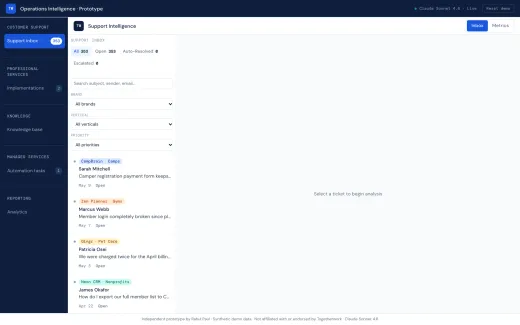
A filterable inbox of 353 seeded tickets: status tabs, search, and brand, vertical and priority filters. Nothing is selected yet, so the detail pane waits for a ticket.
FindSearch, brand, vertical and priority filters
Volume353 seeded tickets, all open at the start
NextSelect a ticket to run triage
Step 02
Ticket detail and AI triage
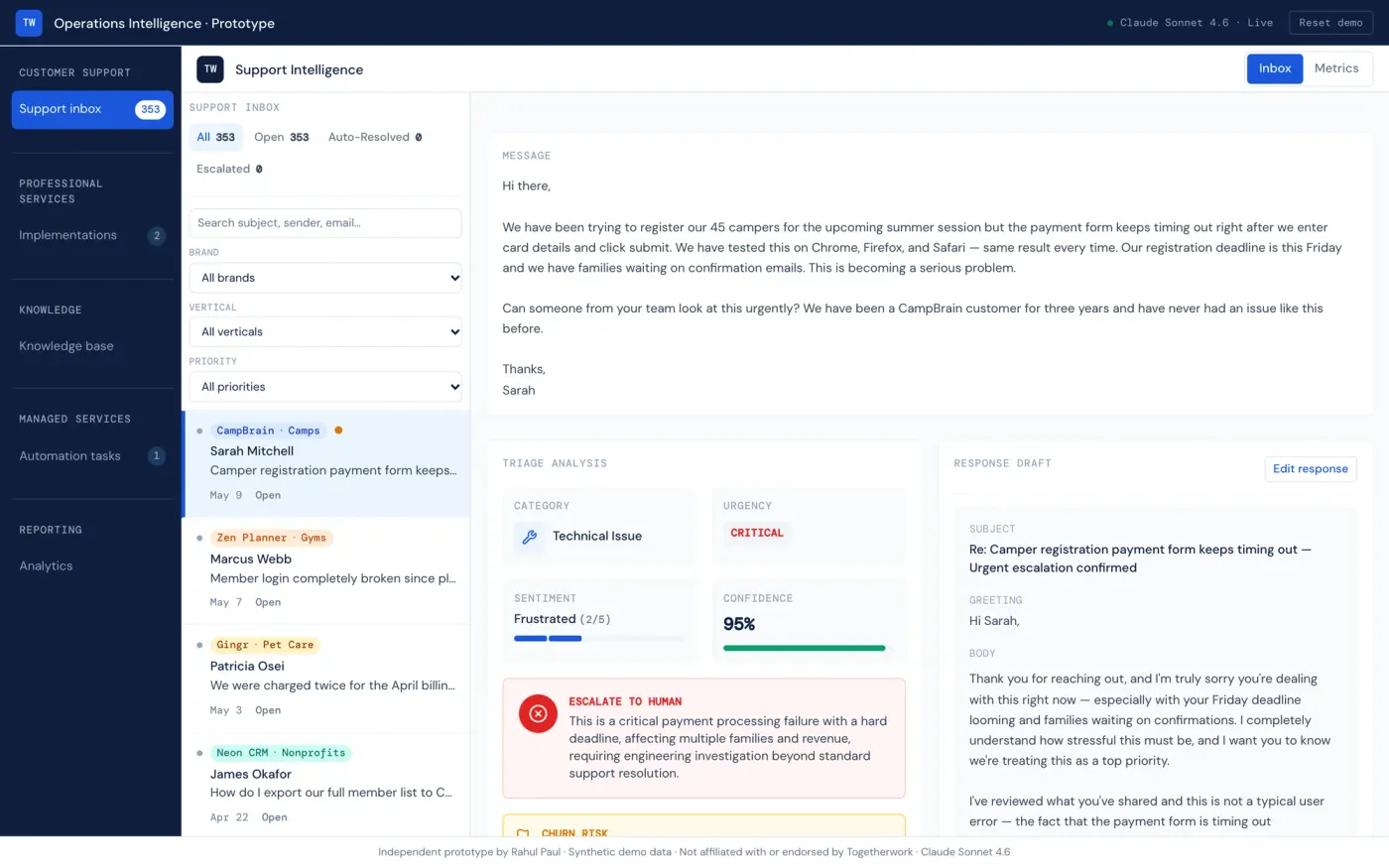
Selecting a ticket shows the message, a triage panel (category, urgency, sentiment, confidence, routing decision and knowledge-base suggestions) and an editable drafted reply with Approve & Send or Escalate. Generated by Claude through the server-side proxy.
Metric cards (active, on track, at risk, average completion) act as filters above a table of eight client onboardings with product, a five-stage progress track, AI status, risk and go-live date.
FiltersMetric cards and status pills
ProgressFive stages per client, delay and stall flags
NextExpand a row for the AI checklist
Step 04
Implementation guidance
Expanding a row shows a next action, a tickable checklist, blockers and a configuration document for that client. Generated by Claude through the server-side proxy.
ChecklistTailored tasks; items can be ticked
BlockersSeverity-rated, when present
Config docCopyable configuration notes
Step 05
Knowledge gaps
Documentation gaps ranked by how many tickets point at them, each with category, affected brands and a “No draft” badge. Article browsing sits above; AI draft generation is not built yet.
GapsEleven tracked, with ticket counts
DraftsBadge shows draft state; none generated yet
ArticlesSearch and category filter above
Step 06
Managed services
Queue, running and exception counts, status filters and a task list with automation percentage and a high-severity exception callout. Run workflow simulates scheduled, running, complete; it is a simulation, not an integration.
QueueBilling, payroll, reconciliation tasks
ExceptionsSeverity callout with the mismatch
Run workflowTimer-driven simulation
Step 07
Analytics
After approving six tickets and running one workflow: deflection against a baseline, a modeled hours-saved figure, churn prevented and a seven-day volume chart. Hours saved comes from assumed minutes per unit, not measurement, and offline samples are not counted as AI actions.
KPIsAI actions, deflection, hours saved (modeled)
VolumeSeven-day ticket volume and resolved share
CapturedProduct build, 2026-10-01
Challenges taken from the code, its comments and the audit rather than recalled after the fact.
Browser-side AI keyThe prototype called Anthropic directly from the browser with a VITE_ key and the direct-browser-access header. That is fine on a laptop and unsafe on a public site, because Vite compiles the key into the page. Public deployment required moving inference behind a server-side boundary first.
JSON from a modelReplies are asked to be JSON only, but can arrive fenced or wrapped. A resilient parser was added, and failures surface as an error with retry that clears the cache.
Duplicate in-flight callsSelecting a ticket or expanding a row could start the same AI call twice. In-flight guards and result caches in App state prevent repeat requests.
A dense support inboxThe inbox is a fixed-height layout with scrolling confined to the list and the detail pane, so filters, list and detail stay visible together. It is a desktop-first layout.
Cross-page stateAnalytics reads tickets, analyses, checklists and tasks from the same session, and Reset has to clear every AI cache, error and simulation together.
Simulated versus generatedThe managed-services workflow is a timer, the hours-saved figure comes from assumed rates, and offline samples are rules. Each is labelled so none passes as measured or model-generated output.
Security lesson
A Vite-exposed Anthropic key suits only a local prototype. Putting the project on a public domain required moving inference behind a server-side boundary first, with validation, size and rate limits, and an AI kill switch.
Finish the pages that are only partly built first, then the production foundations the prototype skips. Items are marked Partial when some of the work exists and Planned when none does.
Knowledge: article generation and coveragePartialGenerate a draft article for each documentation gap with Claude, store it against the gap, and add coverage scores.
Managed services: health and pulsePartialAdd the 30-day health bars and a Monday pulse view that the build plan calls for.
Analytics refinementsPartialFinish the analytics refinements from the plan and replace assumed savings rates with measured inputs.
Real persistencePlannedStore tickets, drafts and decisions instead of keeping them in the browser session.
Authentication and authorizationPlannedAdd accounts and role-based access before any real data is involved.
Audit logging and telemetryPlannedRecord who approved or escalated what, and measure AI quality and latency.
Real integrationsPlannedReplace the mock datasets with real support-desk, PSA, billing and payroll systems.
Original artifacts2
The live product on synthetic data, and the source with its deployment notes and audit.